Following support documents may be useful:
http://docs.fortinet.com/fos50hlp/50/index.html#page/FortiOS%25205.0%2520Handbook/Devices.067.02.html#ww1835612
http://docs.fortinet.com/fos50hlp/50/index.html#page/FortiOS%205.0%20Handbook/policies.031.11.html
I have already blogged about my partial solution that employs some sort of the support for device based firewall rules. However, I have recently found that in Fortigate we can define our personal permanent groups. That is, we can create a group called Servers that regroups different types of machines that will not be purged or cleaned automatically.
Note: At the moment, I do not know how much time it takes but I'm sure that the device list is automatically purged by Fortigate unit on a regular basis.
Custom device group functionality may be particularly useful in scenarios where some mix of clients and servers connect on the same port through Fortigate unit to internet or to some other internal service. In this scenario, we would like to make sure that our servers, VMs etc. are properly classified and allowed the access they are supposed to get not based on the devie type but rather on services they provide.
For example, one of my machines is a VM hosting all sorts of servers with different responsibilities (proprietary update services, print services, windows updates, rdp etc.). For this MAC address, I want all outgoing traffic to be allowed. Moreover, there are 4 MAC's associated with this machine: I want them all grouped under the same name. All this and some more can be achieved by using device groups.
In order to set a custom device group and regroup our special devices, we have to do the following:
- User&Device --> Device --> Device Group create a new group, let us call it Server. This group will be used to create a special rule for our servers.
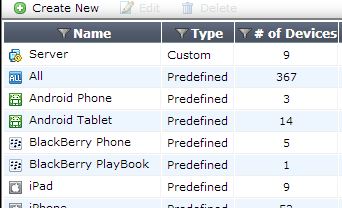


- User&Device --> Device --> Device Definition assuming that your server has already tried to access internet(for updates or other) it will be in the list. Find it and modify the entry by assigning it to a custom group. You could also use the same interface to associate multiple MAC`s belonging to the same machine. <


- In Firewall rules you will be able now to use this group and assign special rules to this group.


